How can I create a Group Discount Ticket Type
Introduction
If you want a simple way to offer and track a reduced ticket where the only rule is a minimum quantity in the cart, creating a specific Group Discount ticket type with a minimum quantity rule is a quick and effective solution.
Summary
For example, if you have multiple ticket types (Adult, Concession, Child) but want to offer a reduced $20 ticket price when more than 8 tickets are purchased as a group booking, this can be done without using a discount code or quantity discount. Each ticket is instead sold as a Group ticket type at the reduced price.
Help Guide
This help guide assumes you have created your event and ready to create your ticket type.
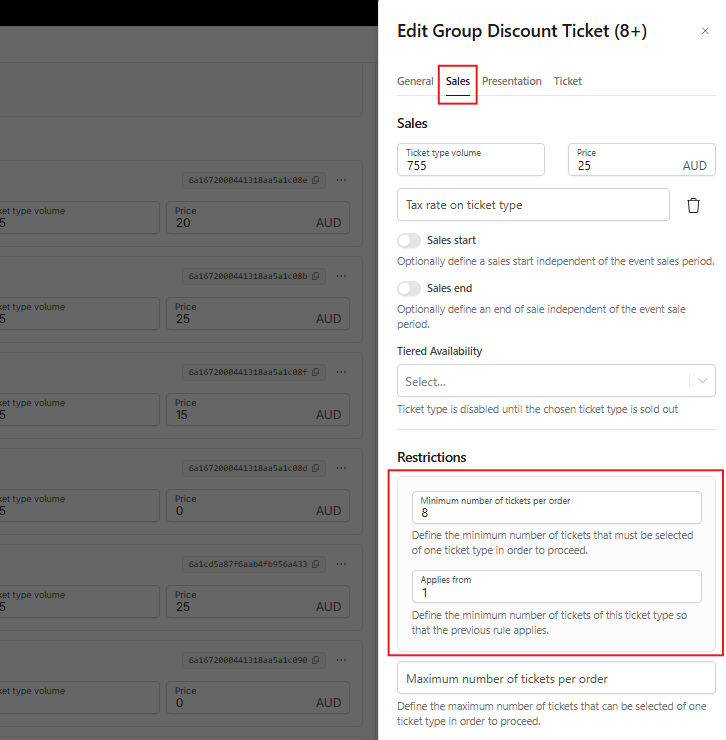
- Open event, go to Ticket Categories, and create a new ticket type e.g. Group Discount Ticket (8+)
- Ensure the ticket is toggled ON to activate it, then click the […] icon to open the ticket menu.
- Click the Sales tab and set the restrictions
- (Optional) Click the General Tab and add a Ticket Description if you would like to do so
- Click the x at the top right corner of the Ticket menu to close
- Click Save
Always review and test your discount in the checkout prior to going onsale to ensure it is working as intended. If you need any assistance or advise, reach out to our friendly support team.