Ticket Scanning - Smartphone set up & how to scan tickets
Introduction
This help article will guide you through how to configure our scanning app onto a smartphone, how to log in and begin scanning. Important: You will need an access token to log in.
For more information, see the related article: Ticket Scanning – Creating an Access Control Token.
Summary
Ticket scanning for events is handled via the dedicated vivenu Scan Manager app, available as a free download on iOS and Android. The app enables fast QR code and barcode scanning, supports offline mode, provides real-time check-in monitoring, and allows manual attendee lookup by last name. It’s built for high-volume events and secure, reliable access control.
Help Guide
Before you begin, make sure you have a stable, high-speed internet connection.
- Download the vivenu Scan Manager app from the appropriate app store onto your smartphone.
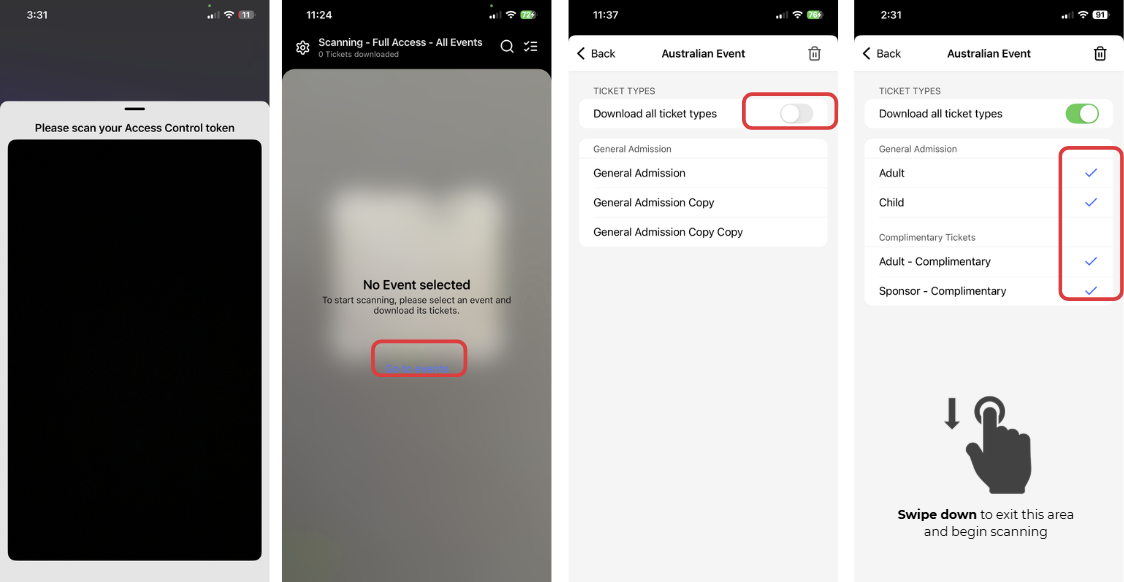
- Open the app on your smartphone and scan your access token to begin
- On the main screen, click Go to Events and select the relevent event. Depending on your access control permissions, you may see only one event or a list of all available events to choose from.
- Next, a list of all available ticket types will appear. We recommend toggling on Download All Ticket Types, a blue tick will appear next to each ticket type, then click back. If you wish to download only a particular ticket type, you can do so, but this will prevent other ticket types from being scanned.
- Swipe down to exit this area and begin scanning
Menu nagivation
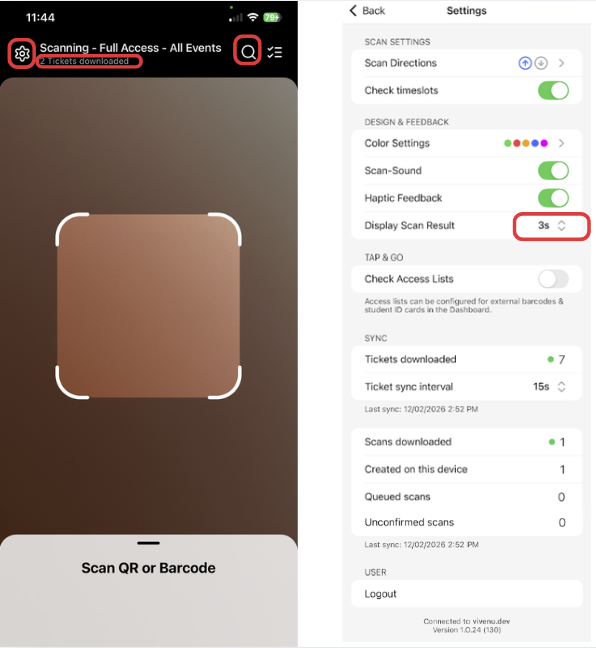
- On the main ticket scanning screen, you will see the total number of tickets downloaded and available for scanning.
- The Settings (cog) icon is located in the top-left corner, you can customise your scanning settings for each device here.
- We recomend changing the Display Scan Result from 3s (3 seconds, default) to something longer, such as 30s (30 seconds).
- The Search icon in the top-right corner allows you to manually look up tickets using a barcode number or the customer’s name.
App Store References

