Promo Codes & Discounts
Introduction
Promo Codes allow you to provide ticket buyers with discount codes for specific events or tickets. Codes can be limited by usage and other redemption rules, and can offer either a fixed discount or a percentage-based discount.
Examples of use:
- Give sponsors a code that allows them to purchase 3 tickets at a discount.
- Give a customer access to a free ticket with a 100% discount.
- To handle a marketing campaign with promo codes that give discounts for an Early Bird Sale.
Summary
Promo code settings can be activated, deactivated and edited at any time. Our help guide will step you through the process to create a code. In additon to the Help Guide, we have included.
- Configuration Definitions
- Promo Code Checklist / Considerations
Help Guide
- Click Discounts, then Promo Codes
- Click Create Promo Code to create a new code (or select an exsisting code to edit)
- Configure the promo code with the settings you require, working through each of the available options.
- Ensure the Active toggle at the top of the page is switched ON to activate the promo code
- Click Create
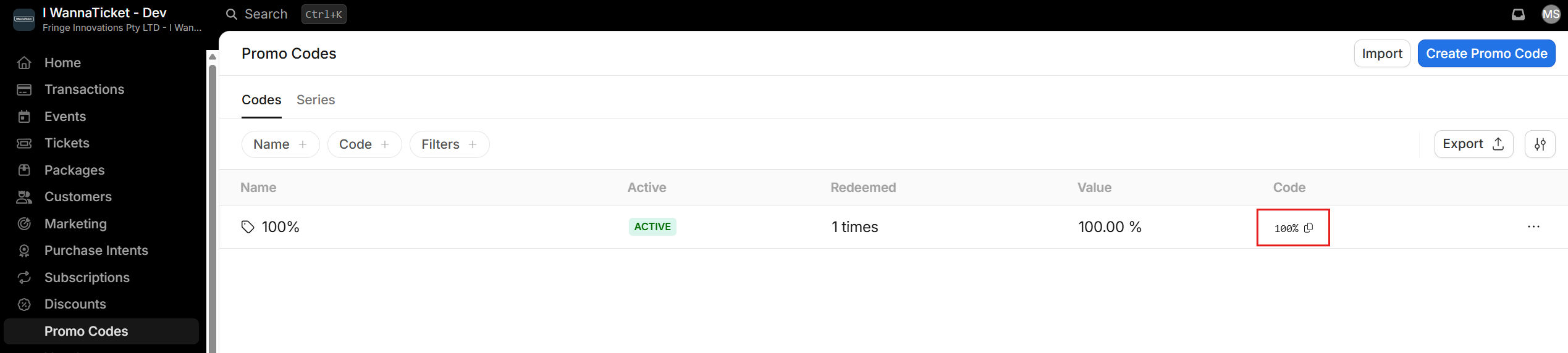
- For quick reference, simply click the Copy icon to copy the promo code to your clipboard.
Always test your code in the checkout using different ticket selections to ensure the discount is working as intended. Alternatively, contact your Account Manager to review the setup before going live.
Configuration Definitions
| Single use | Enable single usage if the discount is to be redeemed for only one transaction. This setting applies to the entire promo code across all customers. |
| Maximum redemption | Define the maximum number of times the promo code can be used. This setting applies to the entire promo code across all customers. |
| Maximum redemption (per Event) | Define the maximum number of times the promo code can be redeemed per event. You can limit which events it applies to further down. |
| Maximum redemption (Tickets) | Limit the number of tickets that can be purchased with this promo code across all events, tickets, and transactions. |
| Combinability | Decide if other promo codes can be added when using the promo code in the same transaction. To allow this, activate the Combinable toggle. |
| Validity date | Ability to select a date until which the promo code can be used. After this date, the promo code will appear as invalid in the shopping cart. |
| Restrict number of tickets | Limit the number of tickets per use that can be in the shopping cart. For example, limit a code to be redeemed for up to 5 tickets in a Transaction. |
| Allow all events | If the promo code can be redeemed for all your events, activate the Allow all events checkbox. If it should only apply to specific events, use the Add event option to select them. |
| Allow all tickets | Select the ticket types for which the promo code will be valid. Note that the ticket types can only be limited if the events have been limited before. If all ticket types can be used, activate the Allow all ticket types checkbox. |
| Select customer | Select a specific customer who can use the discount. Only a single customer can be selected. |
| Enable Promo Code Tagging | Every Customer gets a tag on their customer record after using the promo code which you can use in reporting. Activate the toggle and add the tag you want to use. Confirm your entry by pressing Enter so you see a coloured box around the tag. Note: you can still search transactions which have used the Promo code without tagging the Customer |
| Note | An internal note. The note is only visable internally |
Promo Code Checklist / Considerations
How many times may the code be redeemed in principle?
Consider whether the ticket purchaser may redeem the promo code more than once. A promo code is considered "redeemed" when used in a transaction with successful payment. Note that a promo code can only be redeemed per transaction and not per checkout. So if there are multiple events in a cart, the redemption is per event and not per cart.
How many times can the code be redeemed per event?
Specify whether the promo code can be redeemed as often as you like in a single event or whether the use per event should be limited.
How many tickets can the ticket purchaser buy with the promo code?
Define how many tickets the ticket purchaser can buy with the promo code. If this number is reached, the promo code will appear as invalid.
Can the promo code be redeemed for all events ever created?
Keep in mind that to enable the promo code to be valid for all events you have ever created and will create, you should enable the Allow all events option.
Can the promo code be redeemed for all ticket types ever created?
Keep in mind that to enable the promo code to be valid for all ticket types you have ever created and will create, you should enable the Allow all events option.
Is there a date until which the promo code should be valid?
Note that the validity date is for expiring codes. If you don't set an event restriction, the promo code could still be redeemed for all events in the coming months and years.